Converting CSS color notations
10 min read··~ views
In CSS, color can be specified using different models and notations. For RGB color model, there are hexadecimal and RGB notations. There are other models and notations, but for this post the conversion between notations of hexadecimal and RGB will be focused on. To carry out this conversion, a small utility will be written in Typescript with Deno runtime. This utility will operate on stdin and write the results to stdout. While writing this utility, topics of streams, and standard input/output will be briefly explored.
RGB Color Model
The RGB color model defines colors by their red, green and blue values, and optionally alpha (opacity). Depending on notation, color values are expressed in different ways. In hexadecimal notation values are written in hexadecimal characters, and it can take the following forms: #RGB, #RGBA, #RRGGBB, #RRGGBBAA. Whereas in RGB notation, color values are integers, each between 0 and 255. And the optional alpha value is either between 0 and 1 or 0% and 100%. It takes the following forms: rgb(R G B), rgb(R G B / A), rgb(R, G, B), rgb(R, G, B, A).
Using Regular Expressions
Regular expressions (regexes) are a way to describe a set of strings. Here they are going to be used to describe almost possible way the hexadecimal and RGB color notations can be written.
Using regexes red, green, blue and alpha values contained in a color notation can be extracted. However, as there are many ways to express color in either notation, the regexes would probably get complicated. In simplest form, regexes that match whole color code could look like:
You may have noticed that these regexes would also match incorrectly written color code! This is on purpose, and for this program it's assumed that given color codes are correct.
To match hexadecimal notations: #RGB, #RGBA, #RRGGBB and #RRGGBBAA.
/#[a-f\d]{3,8}/gi
To match RGB notations: rgb(R,G,B), rgb(R G B), rgb(R, G, B, A), rgb(R G B / A), rgb(R, G, B, A%), rgb(R G B / A%) and rgba() versions of these.
/rgba?\((?:\d+[,\s]*){3}(?:[,/\s]+\d?[.]?\d+%?)?\)/g
Now suppose these regexes are used to grab the whole color code in the block of text. Further processing will be required for extracting individual red, green, blue and alpha values of these grabbed colors. I preferred to use regexes to extract these values too, as they can simplify the process.
Regular expressions can be confusing to write, so tools like RegExr are very helpful.
This tool can be used to test and explain the things you don't know about them.
Following regexes are used to extract red, green, blue and alpha values. They work with forementioned different expressions of notations. Though for hexadecimal notation, it meant to process only the long form of the notation. Hexadecimal colors will be converted to their long form before they are parsed by the regex.
For hexadecimal notation:
/#([a-f\d]{2})([a-f\d]{2})([a-f\d]{2})([a-f\d]{2})?/i
For rgb notation:
/rgba?\((\d{1,3})[,\s]+(\d{1,3})[,\s]+(\d{1,3})(?:[,\/\s]+(\d?[.]?\d+%?))?\)/
Functions below are for converting notations from one to another.
For hexadecimal to rgb conversion:
function hexToRgb(match: string): string {
  // transform to long form i.e from  #RGB or #RGBA to #RRGGBB or #RRGGBBAA respectively
  if (match.length <= 5) {
    match =
      '#' +
      match
        .slice(1)
        .split('')
        .reduce((w, c) => w + c + c, '');
  }

  let [_, r, g, b, a] = HEX_INNER.exec(match)!;

  // transform hexadecimal color values to decimal and merge
  const rgb = [r, g, b].map((c) => parseInt(c, 16)).join(', ');

  if (a) {
    // transform alpha from [0x00, 0xFF] range to [0, 1] range
    a = (parseInt(a, 16) / 255).toFixed(2);
  }

  return a ? `rgb(${rgb}, ${a})` : `rgb(${rgb})`;
}
Since the release of color-level-4 specification,
rgb()accepts 4th parameter to add transparency, without the need forrgba().
For rgb to hexadecimal conversion:
function rgbToHex(match: string): string {
  let [_, r, g, b, a] = RGB_INNER.exec(match)!;

  // transform decimal color values to hexadecimal long form and merge
  const rgb = [r, g, b].map((x) => parseInt(x).toString(16).padStart(2, '0')).join('');

  if (a) {
    // transform alpha from [0, 1] or [0%, 100%] range to [0x00, 0xFF] range (long form)
    a = Math.ceil((parseFloat(a) / (a.at(-1) === '%' ? 100 : 1)) * 255)
      .toString(16)
      .padStart(2, '0');
  }

  return `#${rgb}${a ?? ''}`;
}
The functions above are invoked in the following function by being passed to convert parameter. And the
whole parameter is for capturing the whole color code which is to be transformed.
function replace(chunk: string, whole: RegExp, convert: (s: string) => string): string {
  let local = chunk;

  // Get all color notations matching to the `whole` regex
  const matches = chunk.match(whole) ?? [];

  for (const match of matches) {
    // Replace matching color notations with desired notation
    local = local.replace(match, convert(match));
  }

  return local;
}
From the perspective of this function, the chunk parameter is a string of arbitrary length (some block of
text). This function will be used within a transform stream.
Streams
Streams describe the data structure for flow of data. They can be used for reading, writing or transforming data. The way these operations are done is quite different from other methods. Streams operate on data in chunks one at a time, meaning it's not required to load or process entire data all at once. Temporary memory used to store these chunks is called a buffer. Buffers exist until they are consumed. File, network connections, etc. can be operated on using streams.
Mind that I/O models of Node and Deno are different. Node's standard streams are not to be confused with
Deno's stream.
Deno aims to adhere closely to the Web Platform APIs. And It has full support for web streams. Deno supports three kinds of streams: Writable, Readable, Transform. These streams are available in Deno core runtime, can be accessed directly from global scope.
- Writable - Respresents destination for streaming data from which data can be written to. Accepts underlying
sink object as optional argument, which can be used to overwrite
writemethod for implementation. Ex.
const w = new WritableStream({
  write(chunk) {
    // consume chunk
    console.log(chunk);
  },
});

// pushing chunk to be consumed
await w
  .getWriter() // WritableStreamDefaultWriter
  .write('chunk'); // Provides access to push chunk to stream queue
- Readable - Represent source of streaming data from which data can be read. Accepts underlying source object
as optional argument, which can be used to overwrite
startmethod for implementation. Ex.
const r = new ReadableStream({
  start(controller) {
    // pushing chunk to be consumed
    controller.enqueue('chunk');
  },
});

// consume chunk
const chunk = await r
  .getReader() // ReadableStreamDefaultReader
  .read(); // Provides access to consume chunk in stream queue
- Transform - Represents both source of and destination to streaming data from which data is transformed as
it's written and read. Accepts transformer object as optional argument, which can be used to overwrite
transformmethod for implementation. Ex.
const t = new TransformStream({
  transform(chunk, controller) {
    // transforming chunk and forwarding it
    controller.enqueue(chunk);
    // not actually transforming anything just forwarding with out any change
    // which is known as `identity transform stream`
  },
});

// pushing chunk
t.writable // WritableStream
  .getWriter().write('chunk'),

// consuming 'transformed' chunk
const chunk = await t.readable // ReadableStream
                      .getReader().read(),
Using streams also makes it straightforward to apply composition. Streams can be connected with pipes, each
receiving data from the previous stream and passing data to the next stream. And where each stream can have a
single task to do. And all together, complex transformations can be carried out. In Deno, modules implementing
readable stream interface has pipeTo and pipeThrough methods. These methods can be used to connect streams
to each other. pipeTo accepts writable stream as argument, whereas pipeThrough accepts transform streams
as argument. A group of streams connected by pipes is called a pipe chain.
There are lot more to these standard web streams, but for purposes of this post this brief introduction is enough.
Standard Input/Output
From the perspective of this program, we are going to read data from stdin, and manipulate it, then write to
result to the stdout.
In Unix systems every process is initialized with three open file descriptors, and those correspond to stdin(file descriptor 0), stdout(file descriptor 1), and stderr(file descriptor 2). These three file descriptors implements stream interface. stdin is a readable stream, stdout is a writable stream, and stderr is a writable stream. Diagram below illustrates streams and pipes used in this program.
stdin -> Text Decode | Transform Notations | Text Encode -> stdout
Data here flows from left to right. | symbol denotes a pipe. Read from stdin, decoded(raw data to string),
manipulated(notations are exchanged), encoded(string to raw data), and then written to stdout. Text Decoder
converts raw data(ex. Uint8Array) to string, and Text Encoder converts string to raw data(ex. Uint8Array).
The text is decoded because when data is read from stdin, it's of type Uint8Array. And similarly when data
is written to stdout, it has to be encoded to type Uint8Array. And classes for Text Encoder Stream and Text
Decoder Stream are available in global scope in Deno runtime.
A Transform Stream can be implementing by suppliying a transform method to transformer object in instance
creation. And its usage in this program looks like below:
function converter(whole: RegExp, convert: (s: string) => string) {
  // ReadableStream
  const stdin = Deno.stdin.readable;
  // WritableStream
  const stdout = Deno.stdout.writable;

  const textDecorderStream = new TextDecoderStream();
  const textEncoderStream = new TextEncoderStream();

  const converterStream = new TransformStream({
    transform: (chunk, controller) => {
      controller.enqueue(replace(chunk, whole, convert));
    },
  });

  stdin
    .pipeThrough(textDecorderStream)
    .pipeThrough(converterStream)
    .pipeThrough(textEncoderStream)
    .pipeTo(stdout);
}
convert parameter denotes the conversion to be applied, and whole parameter denotes which parts of chunk
will be transformed. It could be invoked as:
converter(HEX_WHOLE, hexToRgb);
// OR
converter(RGB_WHOLE, rgbToHex);
Deno
I chose to use Deno for this program, because I was interested in seeing how different it is from Node. Deno has code formatter, linter, installer, text runner, bundler, compiler, etc. all built in to it. It supports TypeScript out of the box. It contains all of its core API under Deno global variable, and standard web APIs are directly accessible in its global scope. For module import and export, it supports ES Modules syntax. Libraries can be directly imported via URLs. Unless explicitly enabled using CLI flags, access to file system, network interface, or environment is not permitted. And you can read more on its docs.
Whole code is on repository color-convert. Basic CLI functionality has been added. And using Deno it can be directly run as:
deno run https://raw.githubusercontent.com/kuzb/color-convert/master/mod.ts --hex < style.css
Or better, it could be installed. By that I mean deno creates shell script on directory $HOME/.deno/bin, that
runs the deno script.
deno install https://raw.githubusercontent.com/kuzb/color-convert/master/mod.ts
Deno install root can be changed using
DENO_INSTALL_ROOTenvironment variable. By default install root is at$HOME/.deno. To run scripts, installed viadeno install,$HOME/.deno/binhas to be added to path.
Or even, it could be compiled. It creates a self contained executable inside current directory. However mind that this executable is quiet large. For me, this was 75M.
deno compile https://raw.githubusercontent.com/kuzb/color-convert/master/mod.ts color-convert
Given program can be run as standalone script/executable:
color-convert --rgb < style.css
Same file can be read and written:
color-convert --rgb < style.css > out.css && mv out.css style.css
Same file can't be read and written simultaneously, that's why an intermediate file is used. Or utility sponge from moreutils can be used to write to same file. This utility achieves this by waiting for the termination of the command preceding it, and hold the contents in buffer till that.
color-convert --rgb < style.css | sponge style.css
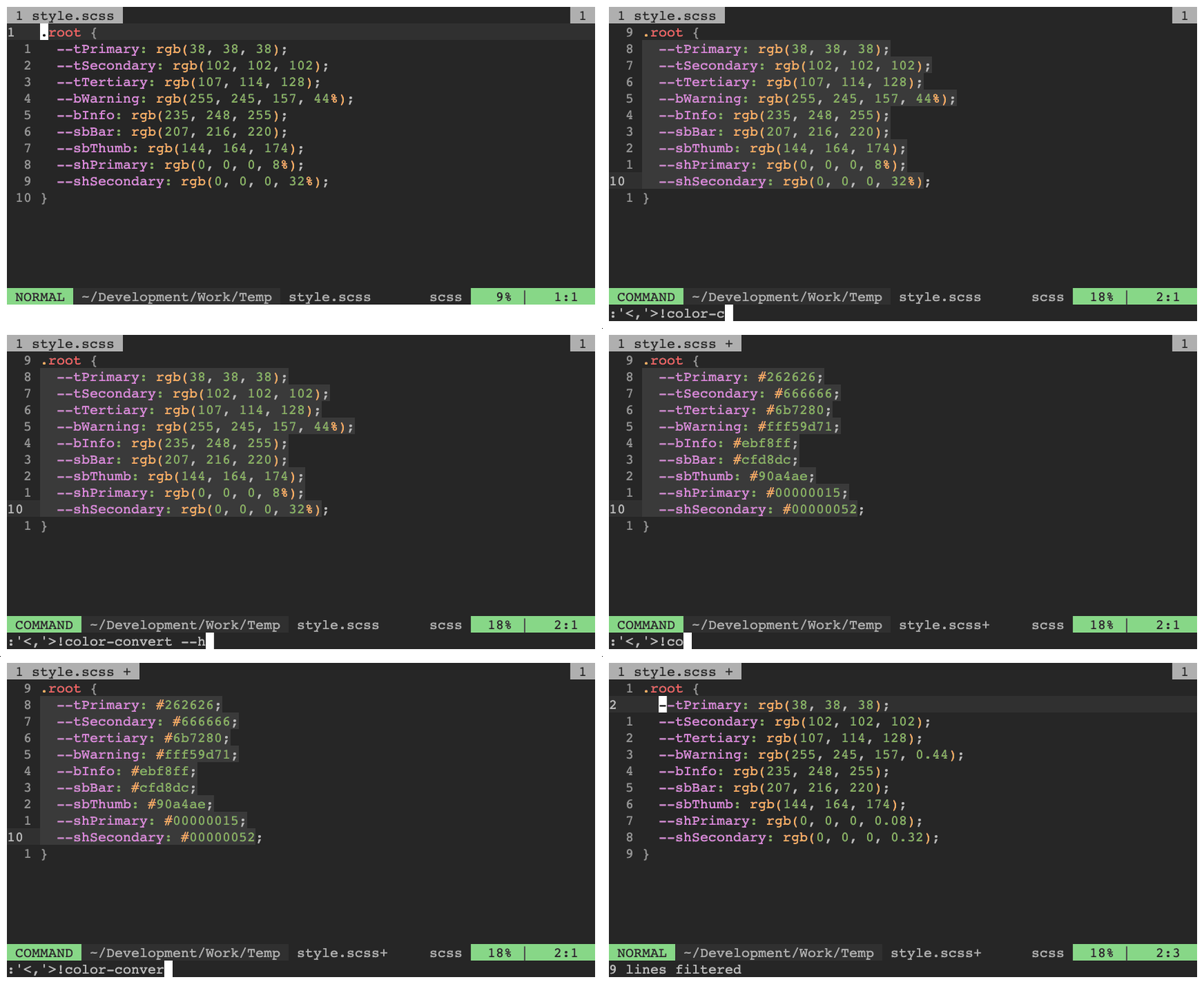
Programs that operate on standard input/output can be quite versatile. For example, this program can be ran inside vim, over range of text.